
Five AI agents that find leads, run your email campaigns, answer your inbox and work LinkedIn. They report to you in Slack. You set it up in Claude Code with our ready-made project folder.
Launch special price: $297 $197
Sped up to 1.5x to save you time. Too fast? Slow it down from the speed button in the player.
Every agent has its own instructions, its own routine and its own journal. They hand work to each other, and only the head of sales talks to you.
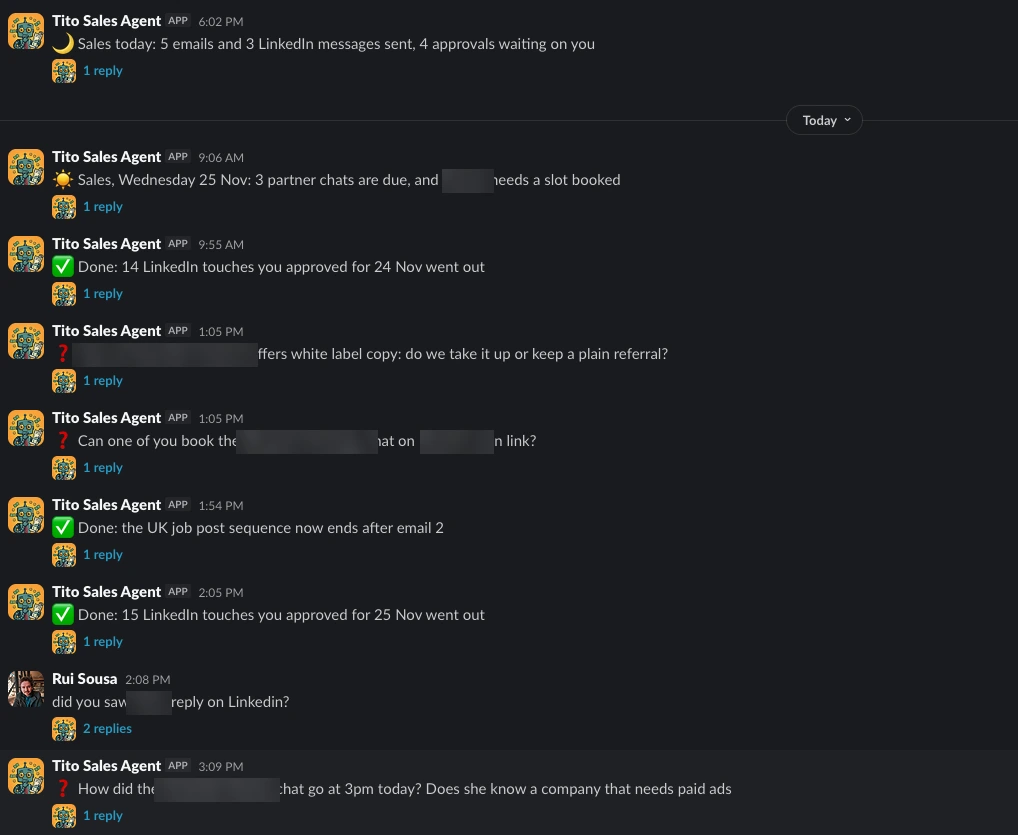
Your single point of contact. Coordinates the other agents, posts the morning plan and the evening wrap-up, and answers you in Slack.
Finds leads that match your ideal customer through Apify, then finds their emails with a three-step waterfall. Asks before it spends your credits.
Builds and runs your cold email campaigns in Instantly or Gmail, watches what performs and proposes new angles to test.
Checks for replies every few minutes. Drafts answers for your approval at first, then handles the routine ones on its own once you trust it.
Sends connection requests and messages from your own Chrome profile. The same setup works for X or Instagram DMs.
Tell Claude Code "add an agent that scrapes Reddit" and it builds one that fits the project, using the tools you already connected.
Every agent starts with a human check on anything that matters. As a task gets reliable, you remove the check and it runs on its own.
A new campaign, a batch of leads to scrape, a reply to send. The card shows exactly what it wants to do, including the draft.
One click to approve. Or comment "change this line" and it rewrites the draft. From ClickUp or Slack, on your phone if you like.
Approved cards get picked up and done. If something breaks, the card moves to Blocked and the head of sales tells you in Slack.
Every action lands in a log. Every rejection with a comment becomes a lesson in the agent's journal, so the next card is better.
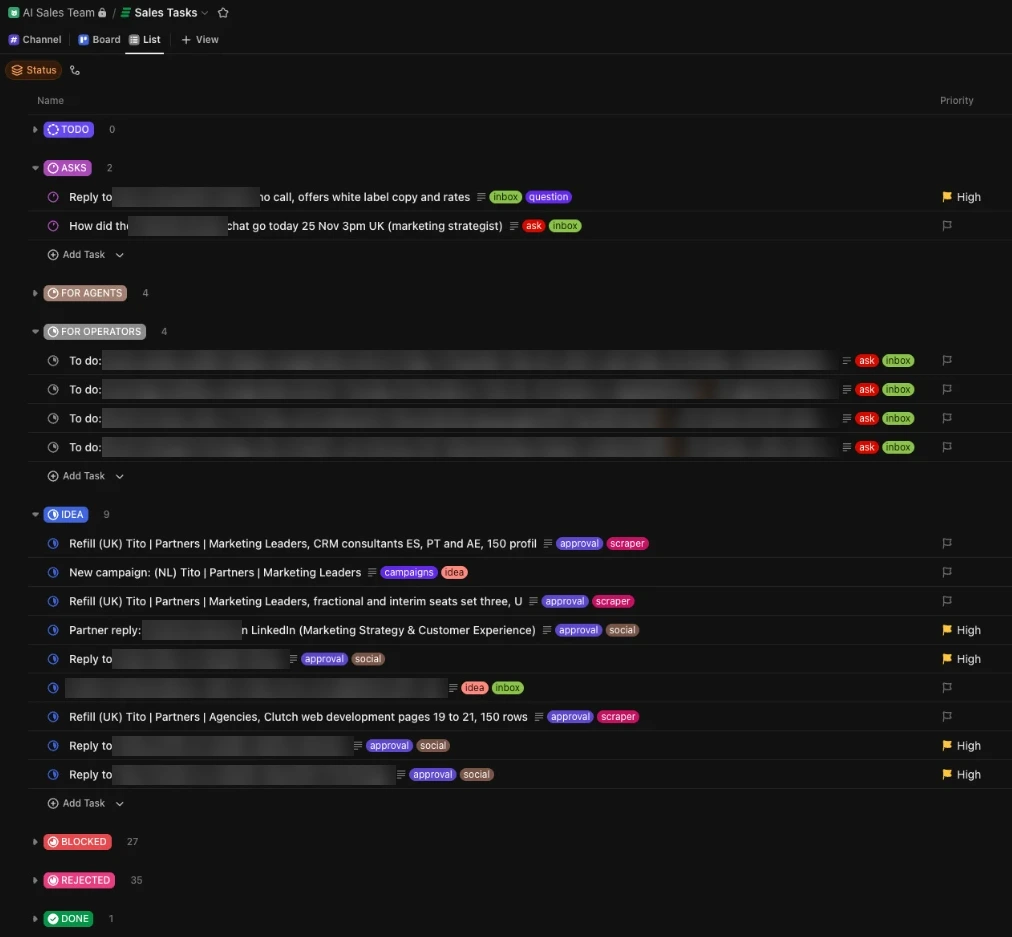
You also get the full board setup we use: To-do, Asks, For agent, For operator, Idea, Approved, Processing, Blocked, Rejected and Done.
The folder you download already holds the agents, their instructions, their routines and the setup guide. It took us months of tweaking and testing to get a team that runs. You start from that.
BUILDING IT YOURSELF
WITH THE SALES TEAM FOLDER
This is the difference from the basic version: the agents live on a server, keep their own memory and follow a routine without you starting anything.
Built on the Claude Agent SDK and run on your own computer. The agents are always listening: for replies in your inbox, messages in Slack and comments on your cards.
Check leads in the morning, review campaigns, check the inbox every few minutes, wrap up at 6. Daily, weekly or monthly. Tell Claude to change one and it does.
Each agent writes down what it did and what it learned, and reads the others' notes. Give the team a goal, like two meetings a week, and it reports against it.
The team starts by showing you what it would do without doing it. When you're happy with the cards, you say "go live".
A zip with all five agents, their instructions, context files, CLAUDE.md files and routines. It comes blank, ready for your company and your targets.
Open the folder and Claude runs the ten setup steps with you, telling you exactly where to click for each key. No separate docs to hunt through.
Rui sets up the whole team live, as if he were you: every API key, the Slack app, the ClickUp board, the server, shadow mode and going live.
Stuck on a key, the Slack app or the server? Ask in the buyers-only chat, where Luis and Rui answer. You also get the written docs and links to every tool we use, including a discount on Apify.
We run this exact setup for The AI Break and for our agency, on a Mac mini that stays on all day. The folder you get is that project with our details taken out.

Co-Founder, The AI Break · Your host

Co-Founder, The AI Break
These are the tools we use in our own companies. The project is set up to cost as little as possible, and Claude swaps in your alternative when you ask.
Where the team is built and run. Claude installs what it needs and guides each step.
Where you talk to the team and approve its work. Telegram, Trello or Asana work too.
How the emails go out. Start free with Gmail, with safe sending limits built in.
Where leads and emails come from. Findymail is optional.
Your lead list and CRM. The team builds the tabs for you.
LinkedIn outreach from your own browser. No automation subscription.
A zip file with the complete project: five agents, their instructions, context files, routines and the guided setup, plus the full video where we build the team live. You unzip it, open it in Claude Code and follow along. You also get access to a private Telegram support chat where Luis and Rui answer questions.
No. Claude Code does the technical work and tells you what to click. But this is more involved than the basic version: you create API keys in each tool, set up a Slack app and a Google Cloud key. The build video shows every one of those steps on screen.
It runs for as long as the computer hosting it is on and awake. We keep ours on a Mac mini that never sleeps. You can also start the server when you sit down in the morning and stop it at night, which is how we began.
A Claude plan that includes Claude Code. Beyond that you can start free: Gmail for sending, Google Sheets, ClickUp's free plan, and Apify's free starting credit. Instantly and Findymail are the paid tools we use for volume and better email coverage, and both are optional.
The project is built around that concern. It starts in shadow mode, where agents show what they would do without doing it. Once live, anything important arrives as a card for you to approve, sending limits are set low by default, and scraping asks before spending credits. You loosen each control when you're ready.
Yes. Tell Claude what you use and it adapts the project: Telegram instead of Slack, Trello or Asana instead of ClickUp, or just a Google Sheet. Slack is optional altogether if you're happy managing everything from cards.
The project is built for Claude Code. If you use Codex, open the folder there and ask it to convert the project. The concept and the structure are the same, with small changes.
Basic is one agent inside the Claude app running scheduled tasks, set up in about an hour by a beginner. This is a team of separate agents on a server, with their own memory, routines and a board where you manage them. You don't need the basic version first, but if you've built it, your business context and tool accounts carry straight over.
7-day no-questions money-back guarantee. Email us within 7 days of purchase and we'll refund you in full.
Five agents. One folder. You approve, they work.